
How to use stayV Host · EP. 28
Using stayV HostManage publication, pauses, archiving and restoration
At a glance
Choose the appropriate guide state when pausing or reopening a property. Compare public-access pauses, operational pauses and archiving, then check the link.


When pausing operations or reopening a refurbished property, review the guide’s state too. Publication pauses, operational pauses and archiving affect guest access and the property list differently. Choose what you need, save and check the link.
| Situation | Action | Guest access |
|---|---|---|
| Hide from new visitors while allowing existing booked guests to continue | Pause guest publication | Guests within their reservation period can continue viewing |
| Pause property operations for a while | Pause operations | No guest can view the guide |
| Remove a long-unused property from the list | Archive | No access; records remain |
At a glance
- Check current and upcoming reservations before changing status.
- Pause guest publication to retain access for booked guests.
- Pausing operations or archiving removes booked-guest access too.
- Restoring an archive does not publish automatically; review and republish.
- Open the guest link when restarting operations.
Learn more
1. Decide what you want to pause
Decide whether you want to tidy the list, hide guidance from new visitors or pause operations entirely. Check current and upcoming reservations.
Consider whether guests who already received a link still need it. As the table shows, the actions have different effects on access.
2. Find the property using filters
Use Draft, Published, Private or Archived filters in Property management. Filters only change the list you see, not the property’s state.
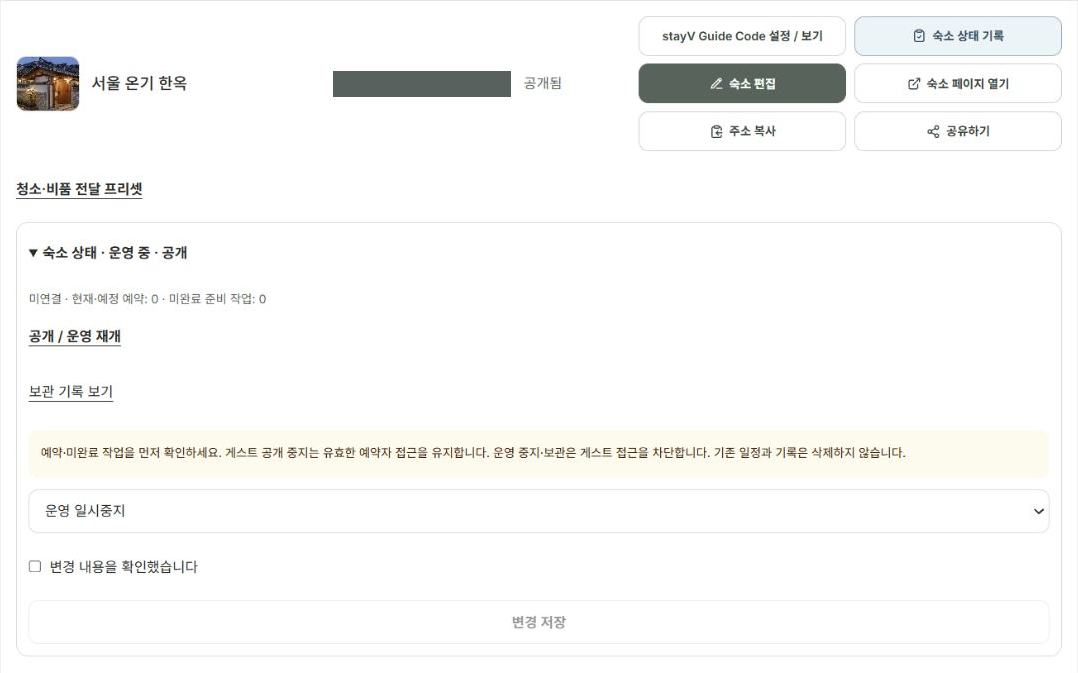
For an actual status change, Pause guest publication hides the guide from new visitors while retaining booked-guest access. Pause operations and Archive prevent booked guests from viewing too; check reservations first.

3. Expand Property status and review the change
Expand Property status and select the action. Read the screen guidance, tick I have reviewed the changes and select Save changes.
Selecting alone does not apply it. Check the list’s status after saving. Use Publish / Resume operations to restart.
4. Republish after restoring an archived property
Archiving tidies the list without deleting reservations or records.
To use it again, find the archived property and restore it. It returns to Draft; review the content and publish before guests can view it.
5. Review before reopening
Check current appliances, photos, host details, contacts and rules. Review the pre-publication checklist and translations too.
Reopening the same property keeps its link. Copying it into a new property creates a different link. Open and check it before sharing.
6. External reservations and distributed files remain
Making stayV guidance private does not cancel Airbnb bookings or block that calendar. Manage reservations separately on the original platform.
Distributed PDFs and QR images also remain. Leave essential instructions in the booking conversation before pausing and recheck the online guide when reopening.
Check your progress
- You reviewed the effect on current and upcoming guests.
- You checked the changed status after saving.
- You opened the guest link when restarting.
Availability and things to know
Free and Plus both allow changing the status of properties you manage.
Read next
Episode 27 · Copy an existing property to create another guide