
How to use stayV Host · EP. 20
Using stayV HostManage Airbnb confirmation codes and stayV Guide Codes
At a glance
Check which code opens each reservation's guide and explain changes clearly, so guests can distinguish Airbnb references from door codes.

When sending a code, guests may ask whether it is an Airbnb code or a number for opening the door. A stayV Guide Code opens protected property guidance. Let’s check the reservation’s code method and explain it clearly.
At a glance
- A stayV Guide Code differs from a door code or Airbnb password.
- Each reservation uses an Airbnb confirmation code or a host-created code.
- Check the In use label on the reservation card.
- Changing methods disables the previous code; tell the guest again.
- Airbnb guests can find their confirmation code in the app’s Trips menu.
Learn more
1. Distinguish guide access from other passwords
A stayV Guide Code opens booked-guest property information. It is separate from an Airbnb login password, SMS verification code or physical door-lock code.
For a host-created code, send that code to the guest. For the Airbnb method, explain how to find their own confirmation code in reservation details. Check the method first.
2. Check the reservation’s code method
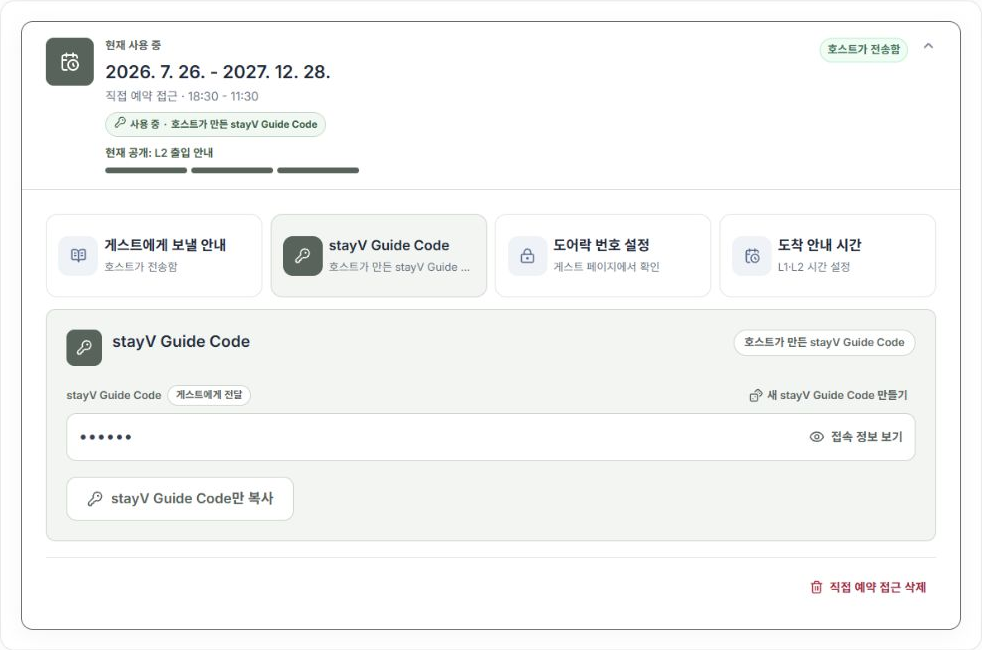
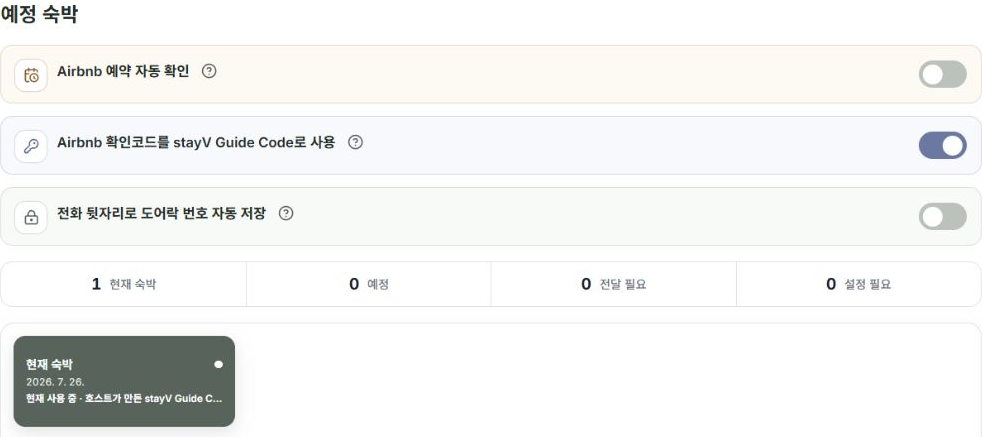
Select the property and reservation in Reservation schedule and access management. Look for In use · Airbnb confirmation code or In use · Host-created stayV Guide Code.
Airbnb confirmation codes can be used only for Airbnb reservations imported with one. Other platforms’ booking references cannot be used in the same way.
3. Change to a host code when needed and save
Open the reservation’s stayV Guide Code. On older cards, select Create new stayV Guide Code. On reservation-linked settings cards, select the host-created method.
Review the new code and finish with Save changes for an existing card or Save stayV Guide Code for a new one.
Switching to a host code disables Airbnb-code access for that reservation. Switching back disables the previous host code. Always send updated instructions to guests who already received a code.
4. Explain confirmation-code lookup from the guest’s screen
Airbnb’s official help says guests can open reservation details in the app’s Trips menu. Their menus differ from the host’s reservation-management screen, so explain the guest path.
Guests can check their own accounts. You do not need their login details or verification codes.
Airbnb reservation-details help
5. Read copied instructions before sending
For the Airbnb method, Copy guest instructions copies the guide link and how to find a code in Airbnb reservation details. It does not include the confirmation code itself. The copied instructions differ for host-created codes.
For codes automatically imported from Airbnb calendars, Show confirmation code displays the value for 30 seconds. Manually entered codes cannot be revealed this way. Use the instructions copied for that reservation when messaging the guest.
6. If a correct code does not open information, check timing
Even a correct code cannot reveal arrival or entry information before its release time. Check code method → reservation dates → release times.
Send essential entry information through the original booking platform too, so guests can enter even if the guide is unavailable. Keep code-bearing screenshots private and avoid sending them to another guest.
Check your progress
- You checked the reservation’s code method.
- You told the guest about any code change.
- You can explain how Guide Codes differ from door-lock codes.
Availability and things to know
Reservation-specific code management is available on the paid Plus plan.
Read next
Episode 19 · Set arrival and entry-guidance times for each reservation
Episode 21 · Prepare reservation messages and record delivery