
How to use stayV Host · EP. 17
Using stayV HostCheck imported reservations and prepare guest guidance
At a glance
An imported reservation may still need guest-guidance preparation. Compare it with the original, confirm it in stayV, then check codes and release times.


A reservation on the calendar can look ready, but imported events may include both stays and blocked dates, and a guest code may still need preparation. Let’s check one Airbnb reservation’s dates and status, then prepare its guidance.
At a glance
- Open one imported reservation and check its property, dates and platform.
- Check the original platform for changes or cancellation.
- If Reservation confirmation needed appears, confirm it in stayV.
- For confirmed reservations, review the Guide Code and release times.
- Airbnb automatic confirmation and using its confirmation code as a Guide Code are different settings.
Learn more
1. Open the imported reservation card
Select a property in Reservation schedule and access management, then open an event from the calendar or list. Check its source and arrival/departure dates.
An Airbnb event may appear while its card still says Reservation confirmation needed. With this notice present, code-protected guest guidance is not ready.
2. Compare with the source platform
Find the same property and dates on the booking platform and check for changes or cancellation. Compare property and dates as well as the guest name.
If dates differ, establish where they changed. For same-day bookings or cancellations, check stayV’s last sync time too.
3. Confirm reservations that need review
After comparing, select Confirm reservation in stayV. This marks the reservation as eligible for guest guidance in stayV. It does not change Airbnb’s payment or booking status.
Continue preparing codes and times in the same confirmed card. You do not need to link it again in another menu.
4. Distinguish two similar settings
With Automatically confirm Airbnb reservations enabled, reservations imported with an Airbnb confirmation code may be confirmed during sync. This does not automatically confirm every platform or event.
Use Airbnb confirmation code as stayV Guide Code determines which code the guest enters to open guidance. It serves a different purpose from automatic confirmation.
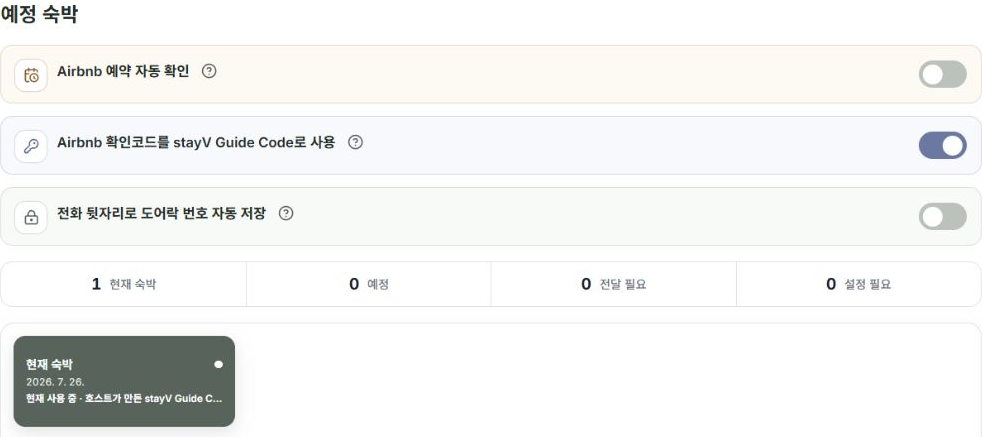
5. Check guidance readiness
After confirming, check the code method and arrival/entry release times. If an Airbnb code is missing or unsuitable, use a host-created stayV Guide Code.
A Booking.com event appearing on the calendar does not make its booking reference usable as a Guide Code. Episode 20 explains code management.
6. Ask support if the difference remains
Check the last sync time and result first. A delayed change does not mean you must delete and recreate the connection.
If unresolved, explain which screen and platform are affected, when it started and how the display differs. You do not need to send calendar URLs, confirmation codes or guest phone numbers.
Check your progress
- You compared property, dates and status with the source platform.
- You handled reservations needing confirmation.
- You checked the confirmed reservation’s code method and release times.
Availability and things to know
Reservation confirmation and guidance preparation are available on the paid Plus plan.
Read next
Episode 16 · Connect your Airbnb calendar to stayV