
How to use stayV Host · EP. 13
Using stayV HostWhat does the stayV guide look like to a guest?
At a glance
Open your finished guide as a first-time guest. Check Home, Guide, Rules, Nearby and Contact in the order guests use them.


Once you have written the guide in the host screen, check the guest view too. Wording familiar to you can feel vague to someone visiting for the first time.
Using the operating Seoul Ongi Hanok guide, let’s identify the property, open useful guidance and find answers in the guest’s order.
At a glance
- Open the actual guest link on your phone rather than relying on the editor preview.
- Check whether times and location are easy to find on Home.
- Follow one appliance card as a first-time guest.
- Switch languages and search with guest terms such as Wi-Fi or check-out.
- Exact addresses and Wi-Fi passwords are initially hidden; codes and release times control access.
Learn more
1. Open the guest link on your phone
Use Copy guest address on the dashboard or scan the Guest guide QR. Use the actual guest link rather than the editor address.
Guests view the guide in their browser without registering or installing an app. Open an incognito window too, to check what a new visitor sees.
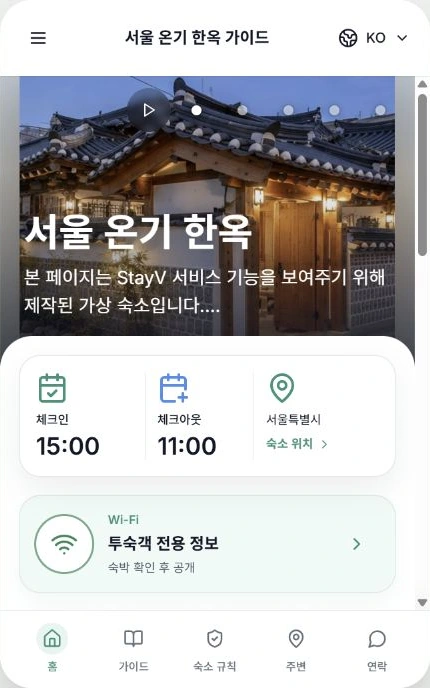
Check the name and photos first. If the cover is dark or shows an unhelpful space, change the order in Photos.
2. Find information needed just before arrival
Home shows photos, an introduction, check-in/out information and buttons leading to key guidance. Imagine a guest outside with luggage, looking at their phone.
Try finding the check-in time, location and Wi-Fi yourself. Fix missing or incorrect information in Basic, Location or Stay information.
An exact address or Wi-Fi password missing from the initial view is not necessarily an omission. It appears after a booked guest enters a code and the scheduled release time arrives.
3. Follow one card from beginning to end
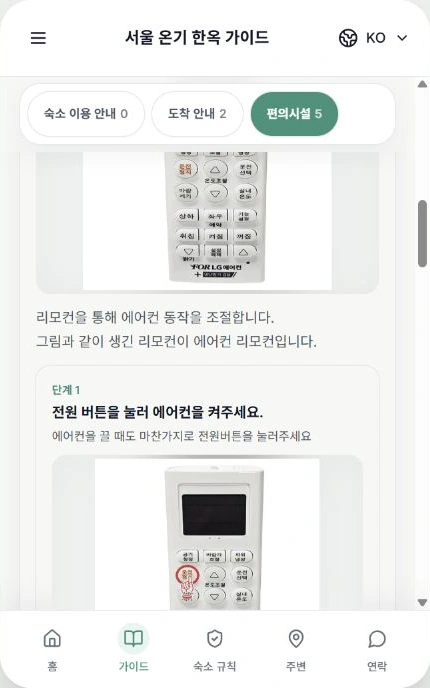
Tap Guide → Amenities at the bottom. Open Living-room air-conditioner instructions and read the photos and explanations as someone new to the property.
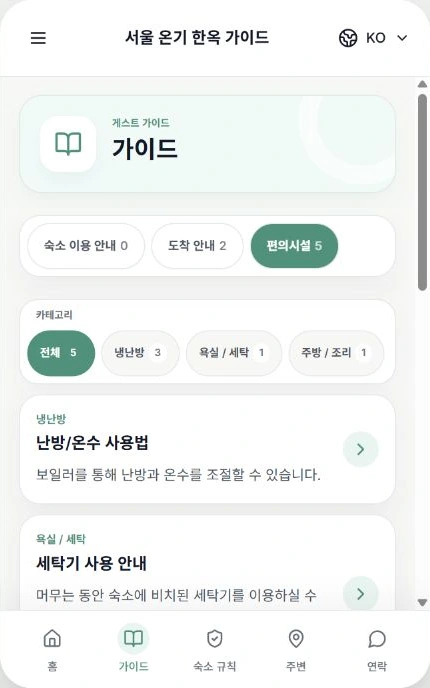
Can you find the remote, turn on the power and choose the desired mode? Enlarge photos and scroll through the steps to compare button labels and descriptions.
Replace vague instructions such as “press the button” with the actual printed name, for example 운전/정지 (On/Off). A clear photo and short steps can be more useful than a long explanation.
4. Check Rules, Nearby and Contact
Move through the bottom menus.
- House rules: Check that important rules stand out and do not contradict each other.
- Nearby: Check nearby tourism information, maps and directions open correctly.
- Contact: Check the contact methods guests can use for questions.
Phone and messenger details are not shown equally to all visitors. Visibility depends on conditions such as reservation verification. If details are missing, check contact settings in Host rather than writing a phone number into the property introduction.
5. Switch languages and search like a guest
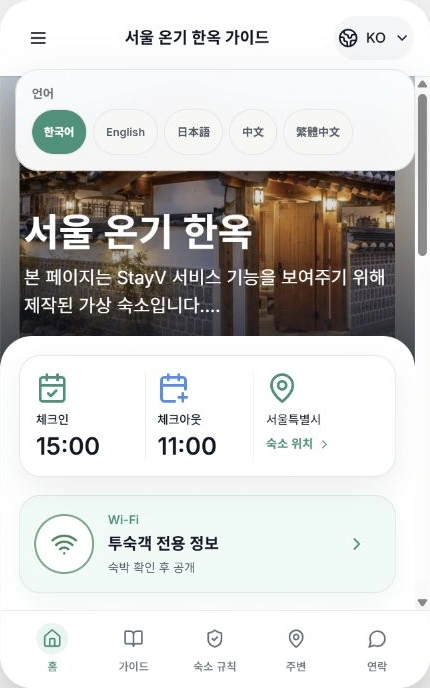
For a multilingual guide, tap the top-right globe/KO and choose English or another language. Reopen the appliance card and rules as well as the introduction.
Return to Korean and open the top-left menu icon → Guide search. Try words guests would type, such as Wi-Fi, check-out or rubbish. If the desired information is hard to find, make card titles or questions more specific.
For example, “Where should I put rubbish when leaving?” is clearer and easier to search than “Information.” Fix awkward translations in Publication’s Translation review and save.
6. Check code-protected guidance separately
When prompted, guests enter the stayV Guide Code supplied by the host. It opens guidance; it is different from the door-lock code.
Booked-guest information also depends on reservation dates and the host’s release time. The same link can show different information at different times.
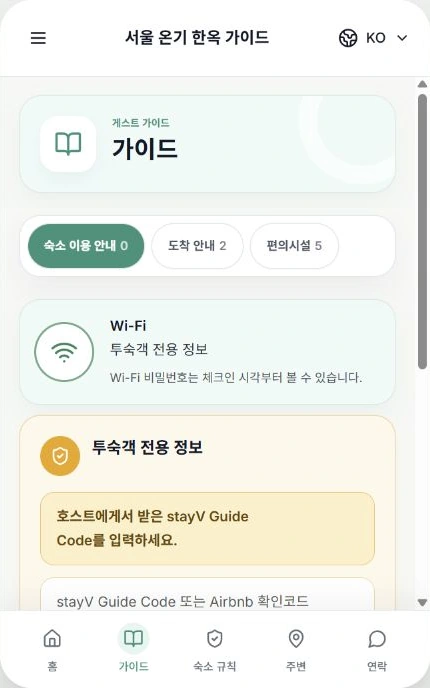
Episode 14 onwards covers reservation codes and release times. Avoid sharing screenshots containing these codes or entry information.
Finally, check whether every screen makes the guest’s next action clear. Fix weak points in the relevant menu, save and reopen the guest view.

Check your progress
- You opened the guest link on your phone and in a logged-out window.
- You followed an appliance card from beginning to end.
- Searching with guest terms finds the intended guidance.
Availability and things to know
Guest guides are available on all plans. Language switching and reservation-specific release times vary by plan.
Read next
Episode 12 · Share your guide with a guest link or QR code
Episode 14 · Separate public guidance from booked-guest information